
Your success in HashiCorp Terraform-Associate-003 is our sole target and we develop all our Terraform-Associate-003 braindumps in a way that facilitates the attainment of this target. Not only is our Terraform-Associate-003 study material the best you can find, it is also the most detailed and the most updated. Terraform-Associate-003 Practice Exams for HashiCorp Terraform-Associate-003 are written to the highest standards of technical accuracy.
Check Terraform-Associate-003 free dumps before getting the full version:
NEW QUESTION 1
Which provider authentication method prevents credentials from being stored in the state file?
- A. Using environment variables
- B. Specifying the login credentials in the provider block
- C. Setting credentials as Terraform variables
- D. None of the above
Answer: D
Explanation:
None of the above methods prevent credentials from being stored in the state file. Terraform stores the provider configuration in the state file, which may include sensitive information such as credentials. This is a potential security risk and should be avoided if possible. To prevent credentials from being stored in the state file, you can use one of the following methods:
✑ Use environment variables to pass credentials to the provider. This way, the credentials are not part of the provider configuration and are not stored in the state file. However, this method may not work for some providers that require credentials to be set in the provider block.
✑ Use dynamic credentials to authenticate with your cloud provider. This way,
Terraform Cloud or Enterprise will request temporary credentials from your cloud provider for each run and use them to provision your resources. The credentials are not stored in the state file and are revoked after the run is completed. This method is supported for AWS, Google Cloud Platform, Azure, and
Vault. References = : [Sensitive Values in State] : Authenticate providers with dynamic credentials
NEW QUESTION 2
What does Terraform use the .terraform.lock.hc1 file for?
- A. There is no such file
- B. Tracking specific provider dependencies
- C. Preventing Terraform runs from occurring
- D. Storing references to workspaces which are locked
Answer: B
Explanation:
The .terraform.lock.hcl file is a new feature in Terraform 0.14 that records the exact versions of each provider used in your configuration. This helps ensure consistent
and reproducible behavior across different machines and runs.
NEW QUESTION 3
terraform plan updates your state file.
- A. True
- B. False
Answer: B
Explanation:
The terraform plan command does not update the state file. Instead, it reads the current state and the configuration files to determine what changes would be made to bring the real-world infrastructure into the desired state defined in the configuration. The plan operation is a read-only operation and does not modify the state or the infrastructure. It is the terraform apply command that actually applies changes and updates the state file.References = Terraform's official guidelines and documentation clarify the purpose of the terraform plan command, highlighting its role in preparing and showing an execution plan without making any changes to the actual state or infrastructure .
NEW QUESTION 4
All standard backend types support state locking, and remote operations like plan, apply, and destroy.
- A. True
- B. False
Answer: B
Explanation:
Not all standard backend types support state locking and remote operations like plan, apply, and destroy. For example, the local backend does not support remote operations and state locking. State locking is a feature that ensures that no two users can make changes to the state file at the same time, which is crucial for preventing race conditions. Remote operations allow running Terraform commands on a remote server, which is supported by some backends like remote or consul, but not all.
References:
✑ Terraform documentation on backends: Terraform Backends
✑ Detailed backend support: Terraform Backend Types
NEW QUESTION 5
What are some benefits of using Sentinel with Terraform Cloud/Terraform Cloud? Choose three correct answers.
- A. You can restrict specific resource configurations, such as disallowing the use of CIDR=0.0.0.0/0.
- B. You can check out and check in cloud access keys
- C. Sentinel Policies can be written in HashiCorp Configuration Language (HCL)
- D. Policy-as-code can enforce security best practices
- E. You can enforce a list of approved AWS AMIs
Answer: ADE
Explanation:
Sentinel is a policy-as-code framework that allows you to define and enforce rules on your Terraform configurations, states, and plans1. Some of the benefits of using Sentinel with Terraform Cloud/Terraform Enterprise are:
•You can restrict specific resource configurations, such as disallowing the use of CIDR=0.0.0.0/0, which would open up your network to the entire internet. This can help you prevent misconfigurations or security vulnerabilities in your infrastructure2.
•Policy-as-code can enforce security best practices, such as requiring encryption, authentication, or compliance standards. This can help you protect your data and meet regulatory requirements3.
•You can enforce a list of approved AWS AMIs, which are pre-configured images that contain the operating system and software you need to run your applications. This can help you ensure consistency, reliability, and performance across your infrastructure4. References =
•1: Terraform and Sentinel | Sentinel | HashiCorp Developer
•2: Terraform Learning Resources: Getting Started with Sentinel in Terraform Cloud
•3: Exploring the Power of HashiCorp Terraform, Sentinel, Terraform Cloud ??
•4: Using New Sentinel Features in Terraform Cloud – Medium
NEW QUESTION 6
Which Terraform collection type should you use to store key/value pairs?
- A. Set
- B. Map
- C. Tuple
- D. list
Answer: B
Explanation:
The Terraform collection type that should be used to store key/value pairs is map. A map is a collection of values that are accessed by arbitrary labels, called keys.
The keys and values can be of any type, but the keys must be unique within a map. For example, var = { key1 = "value1", key2 = "value2" } is a map with two key/value pairs. Maps are useful for grouping related values together, such as configuration options or
metadata. References = [Collection Types], [Map Type Constraints]
NEW QUESTION 7
When does Sentinel enforce policy logic during a Terraform Cloud run?
- A. Before the plan phase
- B. During the plan phase
- C. Before the apply phase
- D. After the apply phase
Answer: C
Explanation:
Sentinel policies are checked after the plan stage of a Terraform run, but before it can be confirmed or the terraform apply is executed3. This allows you to enforce rules on your infrastructure before it is created or modified.
NEW QUESTION 8
One remote backend configuration always maps to a single remote workspace.
- A. True
- B. False
Answer: A
Explanation:
The remote backend can work with either a single remote Terraform Cloud workspace, or with multiple similarly-named remote workspaces (like networking-dev and networking-prod). The workspaces block of the backend configuration determines which mode it uses. To use a single remote Terraform Cloud workspace, set workspaces.name to the remote workspace??s full name (like networking-prod). To use multiple remote workspaces, set workspaces.prefix to a prefix used in all of the desired remote workspace names. For example, set prefix = ??networking-?? to use Terraform cloud workspaces with names like networking-dev and networking-prod. This is helpful when mapping multiple Terraform CLI workspaces used in a single Terraform configuration to multiple Terraform Cloud workspaces3. However, one remote backend configuration always maps to a single remote workspace, either by name or by prefix. You cannot use both name and prefix in the same backend configuration, or omit both. Doing so will result in a configuration error3. References = [Backend Type: remote]3
NEW QUESTION 9
How would you reference the volume IDs associated with the ebs_block_device blocks in this configuration?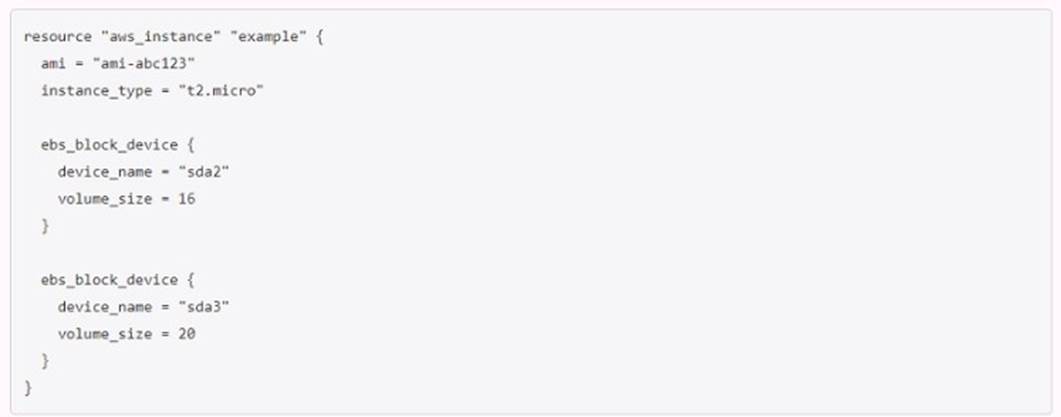
- A. aws_instance.example.ebs_block_device[sda2,sda3).volume_id
- B. aws_lnstance.example.ebs_block_device.[*].volume_id
- C. aws_lnstance.example.ebs_block_device.volume_ids
- D. aws_instance.example-ebs_block_device.*.volume_id
Answer: D
Explanation:
This is the correct way to reference the volume IDs associated with the ebs_block_device blocks in this configuration, using the splat expression syntax. The other options are either invalid or incomplete.
NEW QUESTION 10
You have a Terraform configuration that defines a single virtual machine with no references to it, You have run terraform apply to create the resource, and then removed the resource definition from your Terraform configuration file.
What will happen you run terraform apply in the working directory again?
- A. Terraform will remove the virtual machine from the state file, but the resource will still exist
- B. Nothing
- C. Terraform will error
- D. Terraform will destroy the virtual machine
Answer: D
Explanation:
This is what will happen if you run terraform apply in the working directory again, after removing the resource definition from your Terraform configuration file. Terraform will detect that there is a resource in the state file that is not present in the configuration file, and will assume that you want to delete it.
NEW QUESTION 11
A developer accidentally launched a VM (virtual machine) outside of the Terraform workflow and ended up with two servers with the same name. They don't know which VM Terraform manages but do have a list of all active VM IDs.
Which of the following methods could you use to discover which instance Terraform manages?
- A. Run terraform state list to find the names of all VMs, then run terraform state show for each of them to find which VM ID Terraform manages
- B. Update the code to include outputs for the ID of all VMs, then run terraform plan to view the outputs
- C. Run terraform taint/code on all the VMs to recreate them
- D. Use terraform refresh/code to find out which IDs are already part of state
Answer: A
Explanation:
The terraform state list command lists all resources that are managed by Terraform in the current state file1. The terraform state show command shows the attributes of a single resource in the state file2. By using these two commands, you can compare the VM IDs in your list with the ones in the state file and identify which one is managed by Terraform.
NEW QUESTION 12
Once you configure a new Terraform backend with a terraform code block, which command(s) should you use to migrate the state file?
- A. terraform destroy, then terraform apply
- B. terraform init
- C. terraform push
- D. terraform apply
Answer: A
Explanation:
This command will initialize the new backend and prompt you to migrate the existing state file to the new location4. The other commands are not relevant for this task.
NEW QUESTION 13
You're writing a Terraform configuration that needs to read input from a local file called id_rsa.pub . Which built-in Terraform function can you use to import the file's contents as a string?
- A. file("id_rsa.pub")
- B. templaTefil("id_rsa.pub")
- C. filebase64("id_rsa.pub")
- D. fileset<"id_rsa.pub")
Answer: A
Explanation:
To import the contents of a local file as a string in Terraform, you can use the built-in file function. By specifying file("id_rsa.pub"), Terraform reads the contents of the id_rsa.pub file and uses it as a string within your Terraform configuration. This function is particularly useful for scenarios where you need to include file data directly into your configuration, such as including an SSH public key for provisioning cloud
instances.References = This information is a standard part of Terraform's functionality with built-in functions, as outlined in Terraform's official documentation and commonly used in various Terraform configurations.
NEW QUESTION 14
How can a ticket-based system slow down infrastructure provisioning and limit the ability to scale? Choose two correct answers.
- A. End-users have to request infrastructure changes
- B. Ticket based systems generate a full audit trail of the request and fulfillment process
- C. Users can access catalog of approved resources from drop down list in a request form
- D. The more resources your organization needs, the more tickets your infrastructure team has to process
Answer: A
Explanation:
These are some of the ways that a ticket-based system can slow down infrastructure provisioning and limit the ability to scale, as they introduce delays, bottlenecks, and manual interventions in the process of creating and modifying infrastructure.
NEW QUESTION 15
A provider configuration block is required in every Terraform configuration.
Example:
- A. True
- B. False
Answer: B
Explanation:
A provider configuration block is not required in every Terraform configuration. A provider configuration block can be omitted if its contents would otherwise be empty. Terraform assumes an empty default configuration for any provider that is not explicitly configured. However, some providers may require some configuration arguments (such as endpoint URLs or cloud regions) before they can be used. A provider??s documentation should list which configuration arguments it expects. For providers distributed on the Terraform Registry, versioned documentation is available on each provider??s page, via the ??Documentation?? link in the provider??s header1. References = [Provider Configuration]1
NEW QUESTION 16
......
100% Valid and Newest Version Terraform-Associate-003 Questions & Answers shared by DumpSolutions.com, Get Full Dumps HERE: https://www.dumpsolutions.com/Terraform-Associate-003-dumps/ (New 195 Q&As)